 TiktokAnon
View TikTok Reposts Anonymously & Download 1080p Videos Online
Easily track reposts from public TikTok accounts, including account details, videos, images, likes, shares, views, and comments.
Reposts stay credited to their original creators. Respect their rights, copyright and platform rules.
Have you ever wanted to view TikTok reposts from a public profile without logging into your personal account? A TikTok Repost Viewer lets you quickly check publicly available reposted videos, photos, and other repost information using only a username, @username, or TikTok profile link. The tool works directly in your browser on both phones and computers, so you do not need to install any software. You can explore available reposts, check basic stats such as views, likes, comments, and shares, and download content with ease.
Benefits of Viewing TikTok Reposts Anonymously
Do you know all the benefits of viewing TikTok Reposts anonymously? Here are seven key benefits that can make it easier and more convenient for you to explore reposted content:
- 1. No need to log in to your personal TikTok account.
- 2. View TikTok Reposts anonymously through your web browser.
- 3. Avoid affecting the video recommendations on your personal TikTok account.
- 4. Save time when searching for TikTok Reposts.
- 5. Easily save the videos, images, and audio you need.
- 6. Use the tool flexibly on both phones and computers.
- 7. No need to worry about being blocked by the account.
How to Check Someone's TikTok Reposts on Phone and Computer!
You can view all Reposts from any public TikTok account in just 3 to 5 seconds. Follow these three simple steps to check a TikTok account's Reposts:
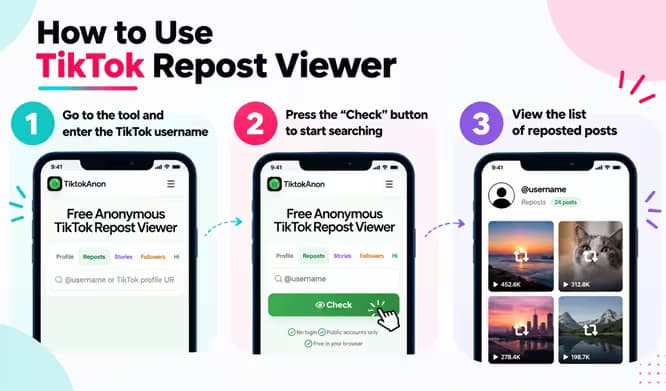
Step 1: Visit the Tool and Enter a TikTok Username
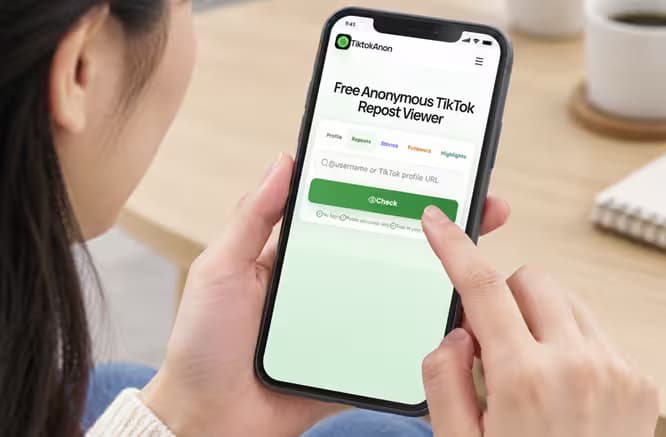
First, visit https://tiktokanon.com/tiktok-repost and enter the TikTok username you want to check. You can enter a username, an @username, or paste the full TikTok profile link.
Step 2: Click ❝Check❞ to Start the Search
Once you've entered the correct information, click the "Check" button or hit "Enter." The tool will then scan the publicly available data from that TikTok account.
Step 3: View the Repost List
If the account is public and has Reposts, the tool will show the available videos, images, and statistics, including the number of views, likes, and shares. You can quickly view the Reposted content online.
13 Key Features of TikTok Repost Viewer
TikTok Repost Viewer does more than help you check Reposts. It also includes useful features such as downloading Repost videos without logos and viewing engagement statistics, along with more than 13 other features you can explore below:
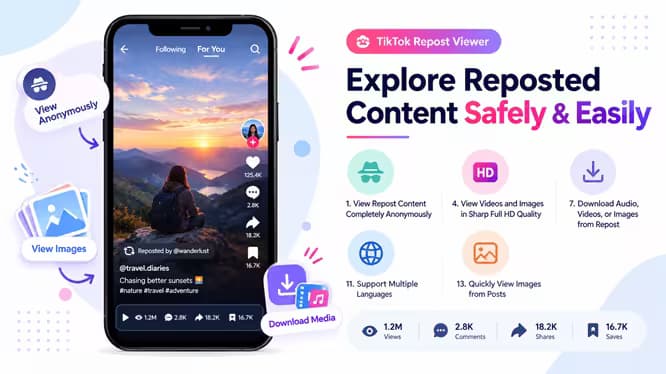
1. View Repost Content Completely Anonymously
You can view Reposted videos, images, and posts on TikTok without logging in to an account. Your viewing activity stays private, leaves no trace, and does not notify the account owner.
2. Simple, Clear, and Easy-to-Use Interface
The tool has a simple interface that focuses on key functions such as searching, viewing content, downloading, and checking post information. You only need to enter a username or TikTok link to start using it.
3. Fast and Stable Content Loading
The online TikTok Repost Viewer loads videos, images, and post data quickly. Its stable performance lets you view content continuously without long waiting times or frequent interruptions.
4. View Videos and Images in Sharp Full HD Quality
The tool supports high-quality video and image viewing from HD (720p) to Full HD (1080p). This helps you see Reposted videos and images more clearly when you want to review the content in greater detail.
5. Works Well on All Devices (iOS, Android, Windows, macOS)
You can access the tool on different devices, including phones, tablets, laptops, and desktop computers. It supports iOS, Android, Windows, Linux, and macOS, with the viewing experience optimized for different screen sizes.
6. Quickly Find Accounts by Username or Profile Link
You can enter a TikTok username directly or paste a profile link to find an account. This feature reduces the time needed to check Repost content from a specific profile.
7. Download Audio, Videos, or Images from Posts
In addition to viewing content online, you can download videos, images, or audio from public TikTok posts. This feature is useful when you want to save favorite content, get ideas, or use it for personal purposes.
8. Completely Free to Use
You can use the TikTok Repost Viewer for free. This gives you easy access to the necessary features without signing up for a complicated paid plan.
9. Check Likes, Comments, Views, Shares, and Posting Date
You can quickly check basic post information, including likes, comments, views, shares, and the posting date. This helps you assess the popularity, reach, and publication time of each Repost post.
10. Compatible with Multiple Browsers
You can use the TikTok Repost Viewer with popular browsers such as Google Chrome, Safari, Firefox, and Microsoft Edge. The tool also works with many other modern web browsers.
11. Support Multiple Languages
The tool supports multiple languages, making it easier for users in different countries to use. Available languages include English, German, French, Italian, Turkish, Spanish, Portuguese, Vietnamese, Indonesian, and Thai, with a user-friendly interface that makes searching and viewing content more convenient.
12. Quickly View New and Old Posts
You can easily switch between newer and older posts to follow Reposted content more conveniently. This feature is especially useful when you want to view content history or find an earlier post again.
13. Quickly View Images from Posts
For posts with multiple images, the tool lets you quickly view each image in a slide or carousel. You can click the next button to view a new image or go back to see images you have already viewed.
Is Viewing TikTok Reposts Safe and Private?
1. The tool stays safe because it only accesses public data that TikTok allows you to view without logging in.
2. You get a high level of privacy because the tool does not connect to your TikTok account, and the profile owner does not receive a notification.
3. The tool does not store your personal information or search history.
4. The tool only works with public accounts, so you cannot view private accounts.
5. The tool uses HTTPS and does not require you to install harmful software.
6. You should also use your browser's incognito mode and a VPN.
Read about how we protect your privacyTiktokAnon vs TikTok Repost Viewer Tools: A Detailed Comparison
Are you unsure which TikTok Repost Viewer best fits your needs? Check the comparison table below to quickly compare the main features of each tool:
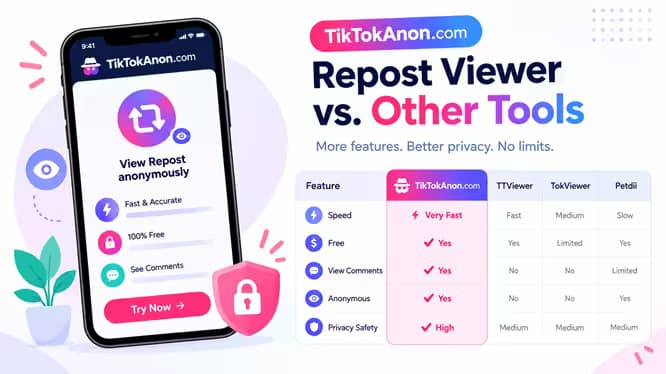
| Feature: | TikTokAnon | TTViewer | TokViewer | Petdii |
|---|---|---|---|---|
| Free to Use | ✔ | ✔ | ✔ | ✔ |
| Speed | Fast | Good | Good | Average |
| Ads | None | Yes | Yes | Yes |
| Save & Repost | ✔ | ✔ | ✘ | ✘ |
| View Comments | Yes | No | No | No |
| User-Friendly | Great | Great | Average | Average |
Frequently Asked Questions for Tiktok Repost!
Here are some frequently asked questions people often have when using our Repost Viewer tool:
See TT reposts right away
Can I View Reposts From a Private TikTok Account?+
No. The tool cannot display reposts, videos, photos, or other content from a private TikTok account. You can only view information that comes from public TikTok profiles and publicly available content.
How Does the TikTok Repost Viewer Work?+
The tool reads public information from a TikTok profile and displays the available data on the web for anonymous viewing. When you enter a username or profile URL, the system checks if the account is public. It then looks for available reposts and displays the results for you to view.
Is It Safe to Use This Tool?+
Yes. The tool provides a safe way to view public TikTok reposts because it uses a trusted API source and does not require you to log in to TikTok. It also does not collect your personal information.
What Information Can I See From TikTok Reposts?+
You can view public information related to available TikTok reposts. This may include reposted videos, the account that reposted them, the repost time when available, video descriptions, the original poster's name, likes, comments, shares, and saves.
Can I View Reposts That Have Been Deleted?+
No. If a repost has been deleted or hidden, or if the original video is no longer public, the tool cannot display or recover it. You can only view content that remains publicly available on TikTok.
Is There a Daily Limit for Viewing TikTok Reposts?+
No. The tool does not limit the number of repost searches you can make each day. This helps support fast access, privacy, and responsible system use. If you experience a limit, try again later or check the notice shown on the website.
Why Are Some TikTok Reposts Not Available?+
Some reposts may not appear because the TikTok account is private, or the post has been deleted or hidden. Content can also have restrictions based on region, age, or privacy settings. The system may also be updating data or experiencing a temporary error. If the issue continues, you can contact [email protected]
Does Using a TikTok Repost Viewer Violate TikTok Policies?+
No. Viewing publicly available content does not normally create an issue. However, you should use the tool for its intended purpose, avoid unauthorized data collection, respect privacy settings, and follow TikTok's terms of use.
Do I Need to Install Software to View TikTok Reposts?+
No. You can normally use the TikTok Repost Viewer directly in your browser without installing an app or software. Enter a valid TikTok username or profile link to start checking available reposts.
Can I View a List of Deleted TikTok Reposts?+
No. The tool cannot display reposts that TikTok has deleted, hidden, or removed from public access. If the content no longer exists or TikTok does not make it publicly accessible, the tool cannot recover or display it.