 TiktokAnon
View & Save TikTok Highlights Anonymously Without Logo/Watermark
View all Highlight collections from public accounts, including collection name, views, likes, and posting time. Download TikTok Highlights in 1080p quality with no logo or watermark.
Reposts stay credited to their original creators. Respect their rights, copyright and platform rules.
Do you want to view TikTok Highlights anonymously without alerting the account owner? With the tool from TiktokAnon.com, you can explore public TikTok Highlights with ease while keeping your viewing private. You can also check key engagement data, including views, likes, and shares, to better understand the content. The tool lets you download Highlight videos and images without limits, updates content quickly, and keeps the experience free from annoying ads.
Why Many People Prefer a TikTok Highlights Viewer
Here are the key reasons thousands of users trust this free tool:
- 1. View TikTok Highlights anonymously without leaving a trace.
- 2. Access content without logging in or creating a TikTok account.
- 3. Save time when searching for videos.
- 4. Download Highlight videos, audio, and images to your device quickly.
- 5. Use a simple interface that works easily on phones, computers, and tablets.
- 6. Avoid unwanted video recommendations from TikTok algorithms.
- 7. Use the tool completely free without installing any software.
- 8. Watch TikTok Highlights in Full HD quality from 720p to 1080p.
- 9. Save Highlight videos and images without watermarks or logos.
- 10. Get fast results, with content appearing within just a few seconds.
- 11. Enjoy stable performance across phones, computers, and tablets.
- 12. Keep your information secure without providing personal data.
3 Steps to Use an Anonymous TikTok Highlights Viewer!
You can view TikTok Highlights anonymously in just three simple steps. Follow the guide below to paste a username and start exploring Highlight content right away:
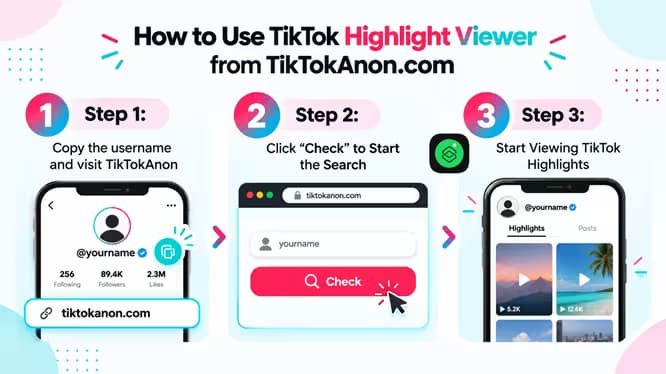
Step 1: Copy the username and visit TiktokAnon
First, copy the TikTok username or profile link you want to check. Then, visit https://tiktokanon.com/tiktok-highlight to access the TikTok Highlights viewer.
Step 2: Click “Check” to Start the Search
Next, paste the username into the search box, such as @abc123. Click the “Check” button to start searching for the available TikTok Highlights.
Step 3: Start Viewing TikTok Highlights
Wait a few seconds while the tool processes the data. You can then view the list of TikTok Highlight videos and download the content you want.
9 Key Features of the TikTok Highlights Viewer
Did you know this tool offers several useful features for viewing, downloading, and analyzing TikTok Highlights? You can access Highlight content and key video information with a simple, easy-to-use process:
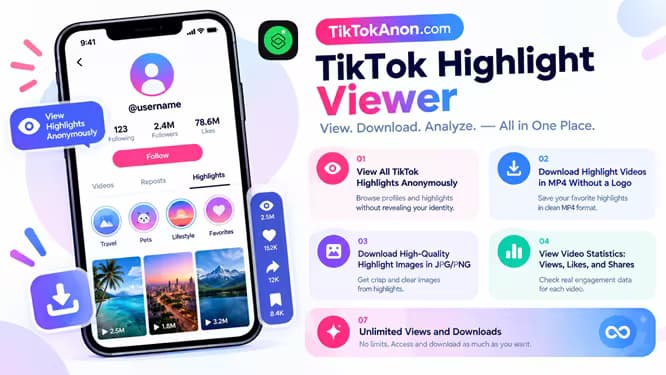
1. View All TikTok Highlights Anonymously
Do you want to revisit Story Highlights without anyone knowing? This tool lets you view available TikTok Highlights privately without leaving a trace on TikTok.
2. Download Highlight Videos in MP4 Without a Logo
You can download TikTok Highlight videos in the widely supported MP4 format for easy viewing on different devices. The tool saves videos in clear quality without logos or watermarks, making them suitable for offline viewing, personal storage, or sharing.
3. Download High-Quality Highlight Images in JPG/PNG
You can download images from TikTok Highlights while keeping their original clarity and colors. The tool supports common formats such as JPG and PNG, so you can easily save, edit, or view images on your phone, computer, or tablet.
4. View Video Statistics: Views, Likes, and Shares
You can check detailed statistics for each video in TikTok Highlights, including views, likes, and shares. This information helps you quickly understand content popularity, engagement, and performance on TikTok.
5. Support Multiple Input Formats: Username or Profile Link
The tool supports different ways to enter TikTok account information, including a username, an @username, or a full TikTok profile link. This flexibility helps you find and view TikTok Highlights more quickly.
6. Compatible With Multiple Devices
The tool works smoothly across different devices, including smartphones, laptops, desktop computers, and tablets. Its user-friendly interface adapts to different screen sizes, so you can view TikTok Highlights easily anytime and anywhere.
7. Unlimited Views and Downloads
You can view and download TikTok Highlights as many times as needed without usage limits. This unlimited access provides a smoother experience for personal use and for users who regularly save TikTok content.
8. Real-Time Data Updates from TikTok
The tool updates data quickly in real time, helping you access the latest content from TikTok. With continuous syncing, you can keep track of new videos, images, and statistics accurately and on time.
9. No Annoying Ads
You can view and download TikTok Highlights without interruptions from annoying ads. This allows you to focus on the content you want to watch or save without waiting for ads or completing unnecessary steps.
Important Tips for Using the TikTok Highlights Viewer on Phone and Computer
1. Use the latest version of a browser, such as Chrome, Safari, or Firefox, for the best experience.
2. On your phone, open the tool in a web browser without installing an extra app.
3. On a computer, use full-screen mode for a more comfortable viewing experience.
4. Check the username carefully before pasting it to avoid selecting the wrong account.
5. View only public content and respect other people's privacy.
6. If TikTok Highlights do not appear, reload the page or check if the account is public.
7. Do not share your TikTok login details because the tool does not need them.
8. Avoid using the tool on a weak network, as videos may load slowly or show errors.
9. The tool only supports public accounts and cannot access private accounts.
10. If you encounter an error, try again, clear your cache, or switch to another browser. You can also contact [email protected] for support.
11. Use a stable Wi-Fi connection to download videos faster.
Read about how we protect your privacyTiktokAnon vs Other TikTok Highlights Viewer Tools: A Quick Comparison
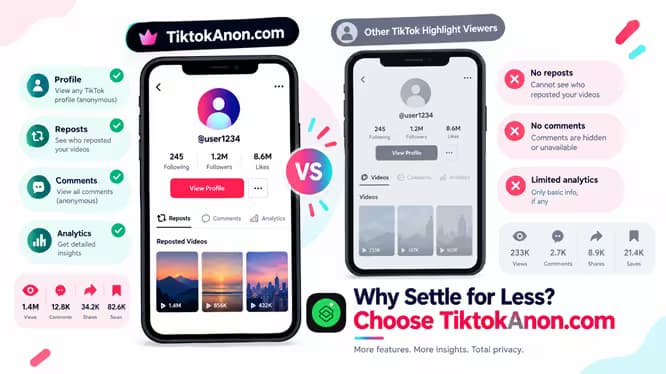
You can find many online TikTok Highlights viewer tools, but their speed, safety, and pricing can vary. Comparing the available options helps you choose a solution that fits your needs. Focus on the features that matter most to you when selecting a TikTok Highlights viewer:

| Feature: | TikTokAnon | TTViewer | TokViewer | TikVib |
|---|---|---|---|---|
| Free | ✔ | ✔ | ✔ | ✔ |
| Speed | Fast | Good | Good | Average |
| Ad-Friendly | Yes | Yes | Yes | Yes |
| Analytics | ✔ | ✔ | ❌ | ❌ |
| Download | ✔ | ❌ | ❌ | ❌ |
| Ease of Use | Good | Good | Average | Average |
Frequently Asked Questions for Viewing TikTok Highlights!
Here are the most common questions about using a TikTok Highlights viewer. These answers explain how the tool works, its safety, and its limits before you start using it:
Browse TT highlights now
What is a TikTok Highlights viewer? +
A TikTok Highlights viewer lets you quickly view TikTok Highlights anonymously. Enter a TikTok username or profile link to view public profile information and the likes and views of available Highlights.
Can I view Highlights from a private account? +
No. You cannot view content from a private account because the account owner limits access to its content.
Does using the tool cost anything? +
No. The tool is completely free to use. You can also use it without daily limits.
Is this TikTok Highlights viewer safe? +
Yes. The tool is safe to use because you do not need to log in to TikTok. It also does not collect your personal data.
Do I need to install an app or log in to TikTok? +
No. You can normally use the tool directly in your web browser without installing software or logging in to TikTok. Enter a valid username or TikTok profile link to start viewing public Highlights.
Can I view Highlights from multiple accounts at the same time? +
Yes. You can check TikTok Highlights from multiple accounts by opening several browser tabs. This lets you access each account separately.
What should I do if an error occurs while checking Highlights? +
First, check the TikTok username or profile link and make sure the account and Highlights remain public. Refresh the page and try again after a few minutes, check your internet connection, or use another browser or incognito mode. You can also clear your cache if needed, and if the issue continues, contact [email protected] for support.
Can I view a list of deleted Highlights? +
No. The tool cannot display or restore Highlights that TikTok has deleted, hidden, or removed from public access.